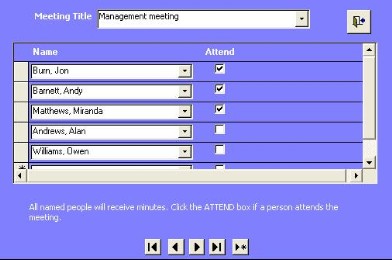
Attendees for meetings can be entered by selecting their name in the drop-down box on the Attendees line shown above. Select individual names and the list of attendees will be built up.
However, you can do this in one click by clicking on the  button.
To set this up, do the following:
Step
|
Action
|
Comments
|
1
|
In the meetings form, click on the button at
the right of |
The forms shown below
appears
|
2
|
If the form is blank, then select the meeting
title. Otherwise go to step 5.
|
|
3
|
Select the name of the
person
|
|
4
|
If the person is an attendee, then click on the
Attend tick box.
|
You can also have people who do not attend, but
receive an e-mailed copy of the minutes. For these people, leave the Attend
tick box blank.
|
5
|
Repeat 3 and 4 for other
people.
|
|
6
|
If the form is not blank, use
the navigation buttons to find either a blank form or one where
you want to edit the attendees for a certain meeting. The carry out steps
3 to 5.
|
These are the navigation buttons. |